
Tried to create a new video project in the VN App and suddenly got a “Project Creation Failed” error? Don’t worry—you’re not alone. This issue is troubling thousands of users, and we’ll explain the reason behind it in this blog. When you try to create more than 100 projects, the app immediately prompts you to purchase a premium subscription and prevents you from creating project 101. We have a solution.
This problem is easily solved—without spending a single penny. Today, we’ll explain step-by-step how to create the 101st project, how to free up space by deleting old projects, and whether premium is the only option.
Thousands of creators and Reels makers are frustrated with this error because they want to start each project from scratch. “I created 100 projects, and now I want to create a new Reel, and it’s asking for premium!”—this complaint is being heard everywhere. Fortunately, even the free version of VN App has a limit of 100 projects, and there’s an easy way to increase it. Let’s delve into the details.
What is the VN App Project Limit?
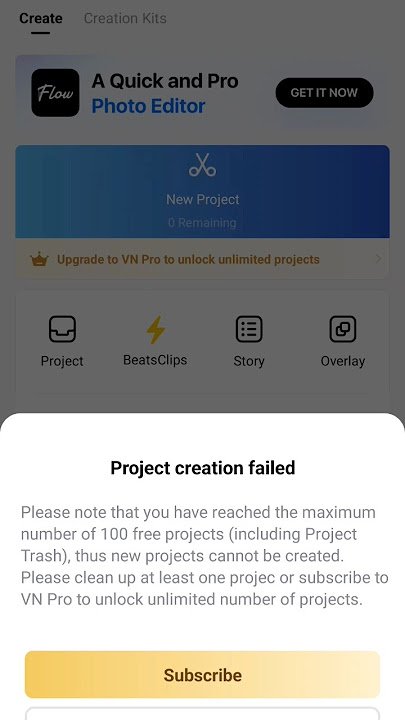
VN App (Video Editor by Ubiquiti Labs) only allows free users to create 100 projects. As soon as you create the 101st project, a “Project Creation Failed – Upgrade to Premium” popup appears, prompting you to subscribe. The reason is clear: storage and server limits.
Free limit: 100 projects (video, effects, and audio are saved in each project).
Premium benefits: Unlimited projects, 4K export, and watermark removal.
Effect: Not deleting old projects blocks new work.
Also Read: VN App vs CapCut 2026, Who Best Video Editing App? Full Comparison
How to Fix the VN App Project Creation Failed Error?
The easiest and free way to fix the VN App Project Failed error is to delete old, unused projects. This will free up space, allowing you to create a new project from scratch. Or you can delete the old project from Edit and then edit it.
Step-by-Step Guide:
- Open the VN App and go to the home screen.
- Tap the “My Projects” section.
- View a list of all projects – here you’ll see the total number of projects.
- Select the projects you no longer need.
You can start with the oldest projects, prioritizing those you haven’t opened in more than 6 months.
- Long-press on the project and tap the delete icon.
- Delete at least 3-5 projects (deleting just 1-2 won’t suffice).
- Close the app and reopen it.
- Now try creating a new project.
How to increase VN App project creation?
If you want to increase the number of VN App projects to 100, VN Editor App has launched a premium plan, which doesn’t limit you beyond 100 if you subscribe to the app’s paid monthly or yearly plans.
Below, we’ve listed the VN Pro Subscription.
- Use all features for free.
- No premium lock.
- Limited use (there may be a limit on creating folders).
- All ads are removed.
- End credits/watermark removal.
- Unlimited use.
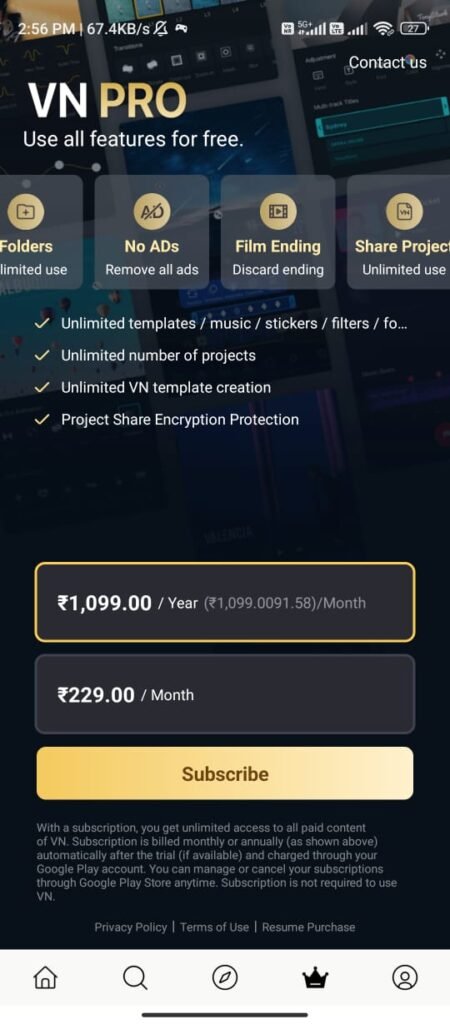
Extra Premium Benefits:
Unlimited Templates / Music / Stickers / Filters / Fonts
Unlimited Projects (100+ Limit Eliminated)
Unlimited VN Template Creation
Project Share Encryption Protection
Annual Plan (Most Affordable)
₹1,099.00 / Year
Monthly Plan
₹229.00 / Month
If you plan to use it for a long time, the annual plan is better for you.
Who Should Buy VN PRO?
The Premium plan of this VN Editor App is suitable for those who edit videos daily, need editing as a content creator, only edit in the Android app, are bothered by ads, and want professional templates/features. For them, paying for the Pro plan is the best option.
If you have to do some small editing or there is not much need for it, then you can work within 100 projects in VN Editor App, however, most people use the free plan and you do not get to see so many ads.
Conclusion
The easiest free solution for users troubled by the “Project Creation Failed” error of VN App is to delete 10-20 unused projects from the old 100 projects to free up space or try alternatives like Cash Multi-Account. However, casual creators will only need the paid version if they want unlimited projects, 4K export and an ad-free experience. If you need to keep up with more than 100 projects, then you can go for the paid version of VN App.


Radhika Bhati
From Jaisalmer