Creating emotional AI videos is trending fast—especially romantic, dreamy edits where a person lies in flowers and the scene transforms magically. Since you create reels about schemes and AI visuals, this style can massively boost your Instagram reach if done correctly.
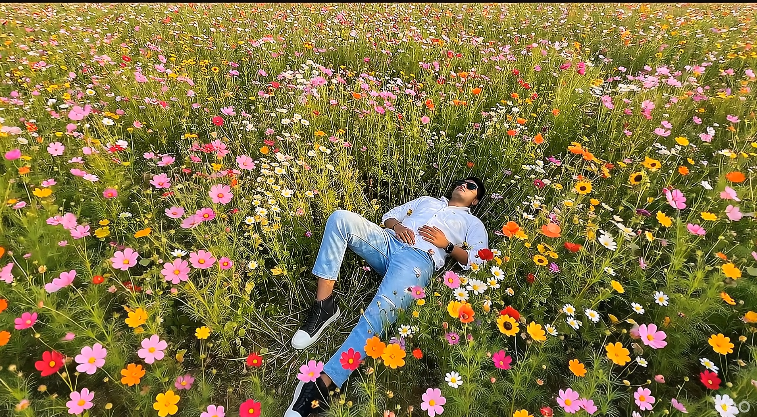
Okay, so if you want to make this beautiful, emotional scene where a guy is lying in a big field of wildflowers and slowly falls asleep while his upper body kind of gently turns into soft floating particles, the very first thing — and honestly the most important — is getting your starting photo right.
The picture you begin with has to be really good quality. You need to see his whole body clearly, from head to toe, in nice natural light. Don’t use a blurry shot, a dark one, or anything where he’s half-hidden.
Most importantly, once you pick that photo, you cannot change the guy himself at all. No cropping his head, no zooming in, no messing with his face, skin color, hair, clothes, or how his body looks. Keep him 100% exactly the same as in the original picture.
Think of your photo like the heart of the whole edit. If the person already looks strange, out of focus, or badly lit, even the smartest AI trick won’t be able to make it feel real and cinematic later. A strong, clean, natural base photo is what makes the magic feel honest instead of fake.
That’s it — start with a great real photo of the full person, and don’t touch anything about him. Everything else (flowers moving, particles, drone pull-back) builds on top of that untouched human foundation.
A man slowly falls asleep in love
Flowers rise and surround him
The upper body dissolves gradually
Camera performs a smooth drone zoom-out
Everything looks ultra-realistic (NOT CGI)
Scene Concept (Understand Before Editing)
Before using any AI tool, you first need to understand how the story and emotions should move. Viral AI videos work so well because they follow a clear emotional flow, not just random effects.
Story Flow
- Person lies naturally in dense wildflower field
- Golden hour sunlight creates romantic mood
- Person slowly falls asleep (love emotion)
- Flowers subtly rise and move
- Upper body begins dissolving into particles
- Drone camera slowly zooms out
- Scene ends dreamy and emotional
Imagine this simple story: a person is lying naturally in a thick wildflower field, with soft golden‑hour sunlight around them, creating a romantic, peaceful mood. Slowly, that person starts falling asleep, bringing out a feeling of love and calm. At the same time, the flowers around them gently rise and move as if responding to the emotion. Then, the person’s upper body slowly fades into soft particles, almost like they’re becoming part of the light and nature. While this is happening, the camera slowly zooms out like a real drone, giving a wide, cinematic view, and the whole scene ends in a dreamy, emotional way. It is this kind of storytelling that keeps viewers watching till the very end.
Prompt Image Make :
Copied!
Prompt Flow First to Last Image :
Copied!
Flow Website Link
Prepare Your Original Photo (VERY IMPORTANT)
Your prompt clearly says:
✅ Do NOT change face
✅ Do NOT change clothes
✅ Do NOT crop
✅ Keep full body visible
So first:
📸 Image Requirements
- Full body visible
- High resolution
- Natural lighting
- No heavy blur
- Straight body posture
🔧 Quick Preparation Tips
- Use Remini or Lightroom (optional)
- Slightly sharpen image
- Keep original aspect ratio
- Export in high quality
⚠️ If the base photo is weak, AI output will look fake.